
Everything a service day needs.
One plan has all of it. Nothing here is an add-on.
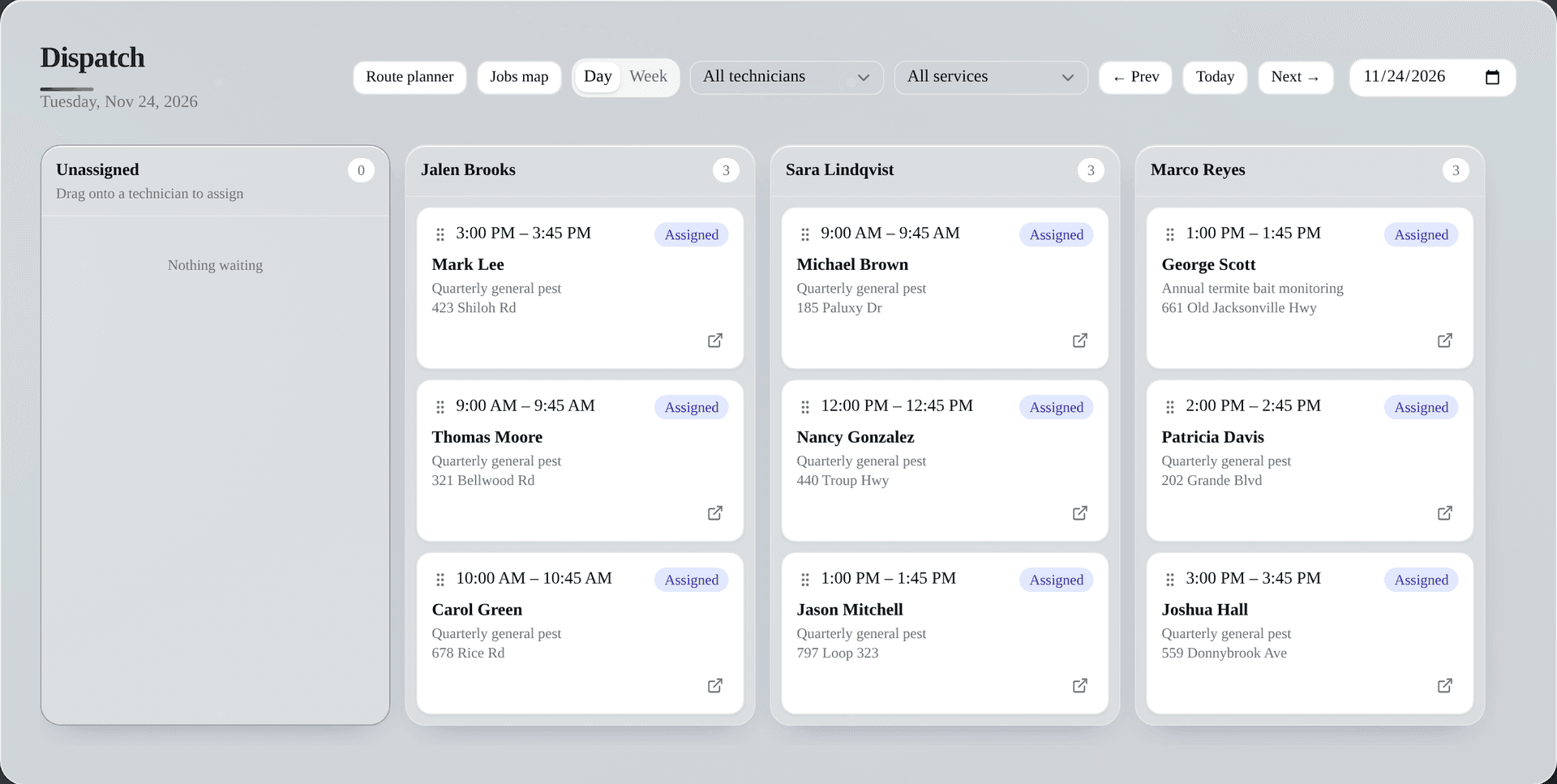
Drag a job to a technician.
The dispatch board shows every technician’s day side by side. When the day changes, move the job. The technician’s phone shows the new day.
- Unassigned work sits in its own column
- Day and week views
- Filter by technician or service
Drag a job onto a technician. Or tap a job, then tap a column.
The real screens.
Taken from the app, in a demo company with made-up customers.
The dispatch board
One column for each technician and one for work nobody has yet. Pick a job up by its handle and drop it where it belongs.
- Each card shows the time window, customer, service and address
- Status shown on every card
- Jump to the route planner or the jobs map from the same screen
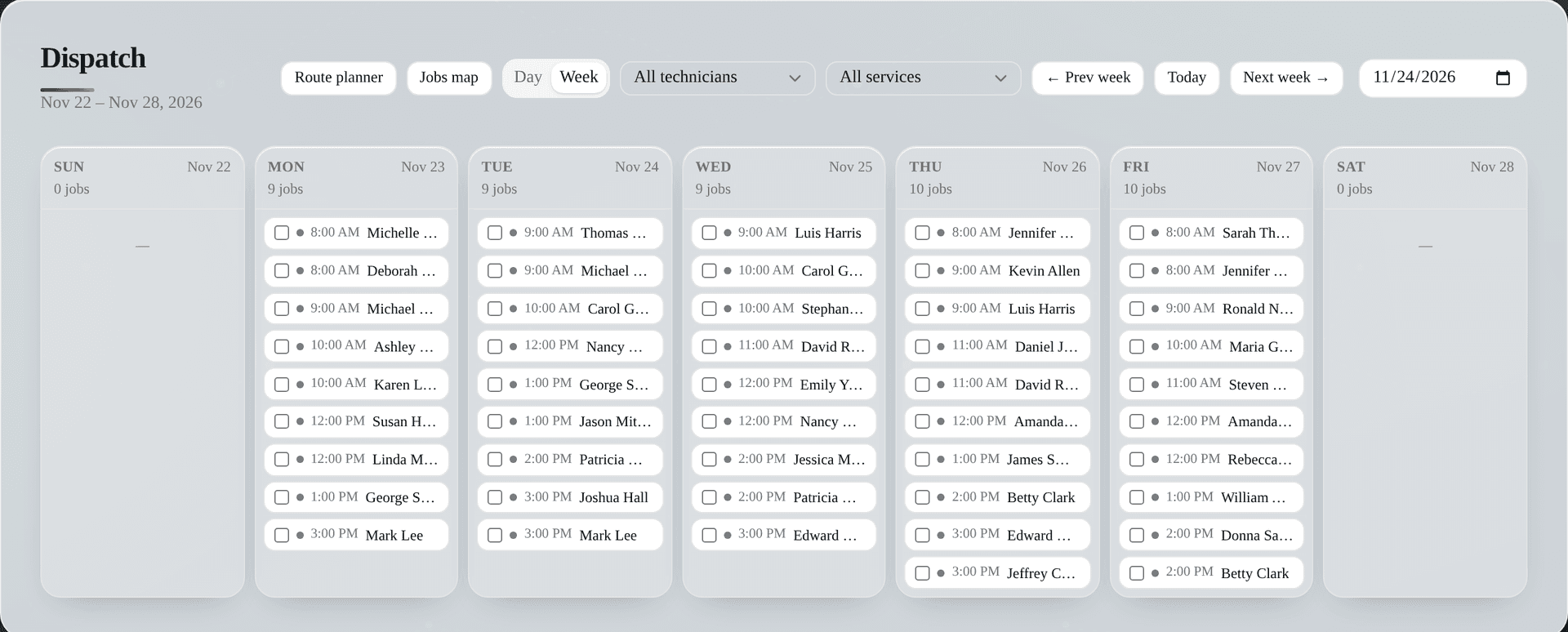
The week ahead
The same jobs laid out Sunday to Saturday, so a light Tuesday or an overloaded Friday shows before it happens.
- Job count for every day
- Filter to one technician or one service
- Step a week forward or back
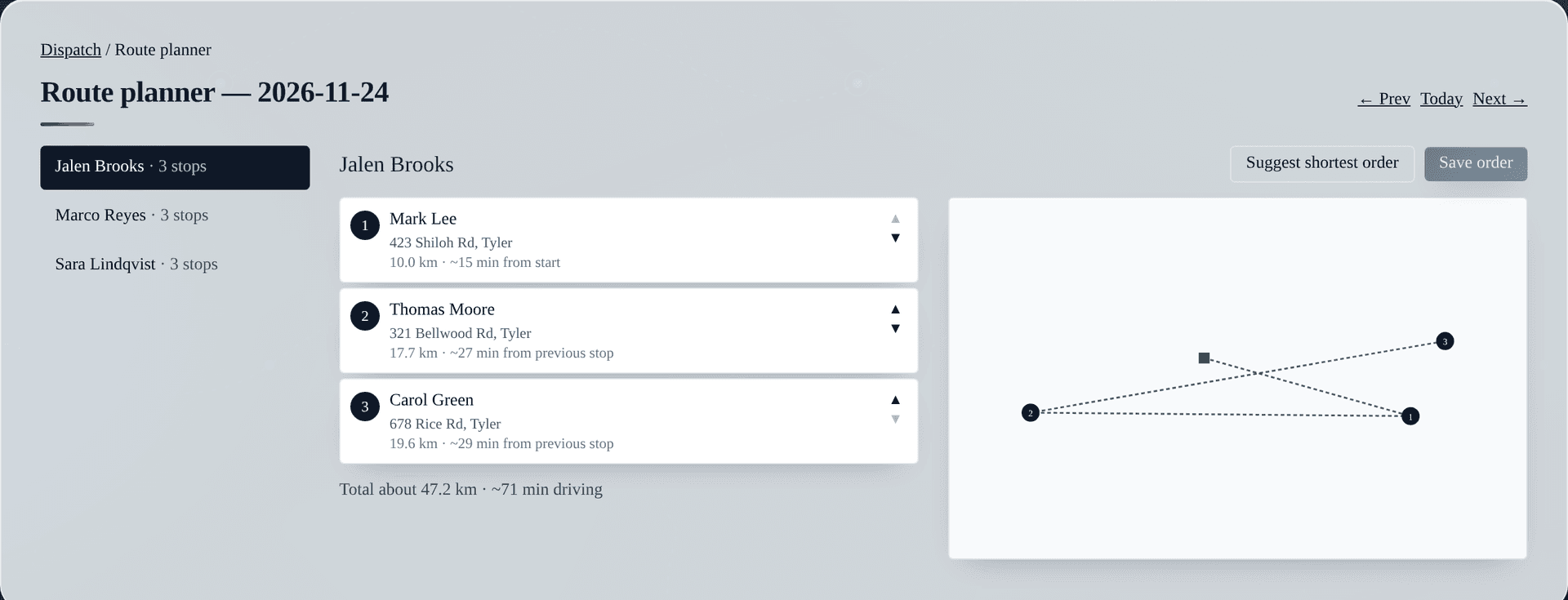
The route planner
Pick a technician and see the stops in order, with the distance and drive time from one to the next. On the live app the stops sit on a street map.
- Suggest shortest order does the sorting for you
- Arrows move a single stop up or down
- Total distance and drive time for the route
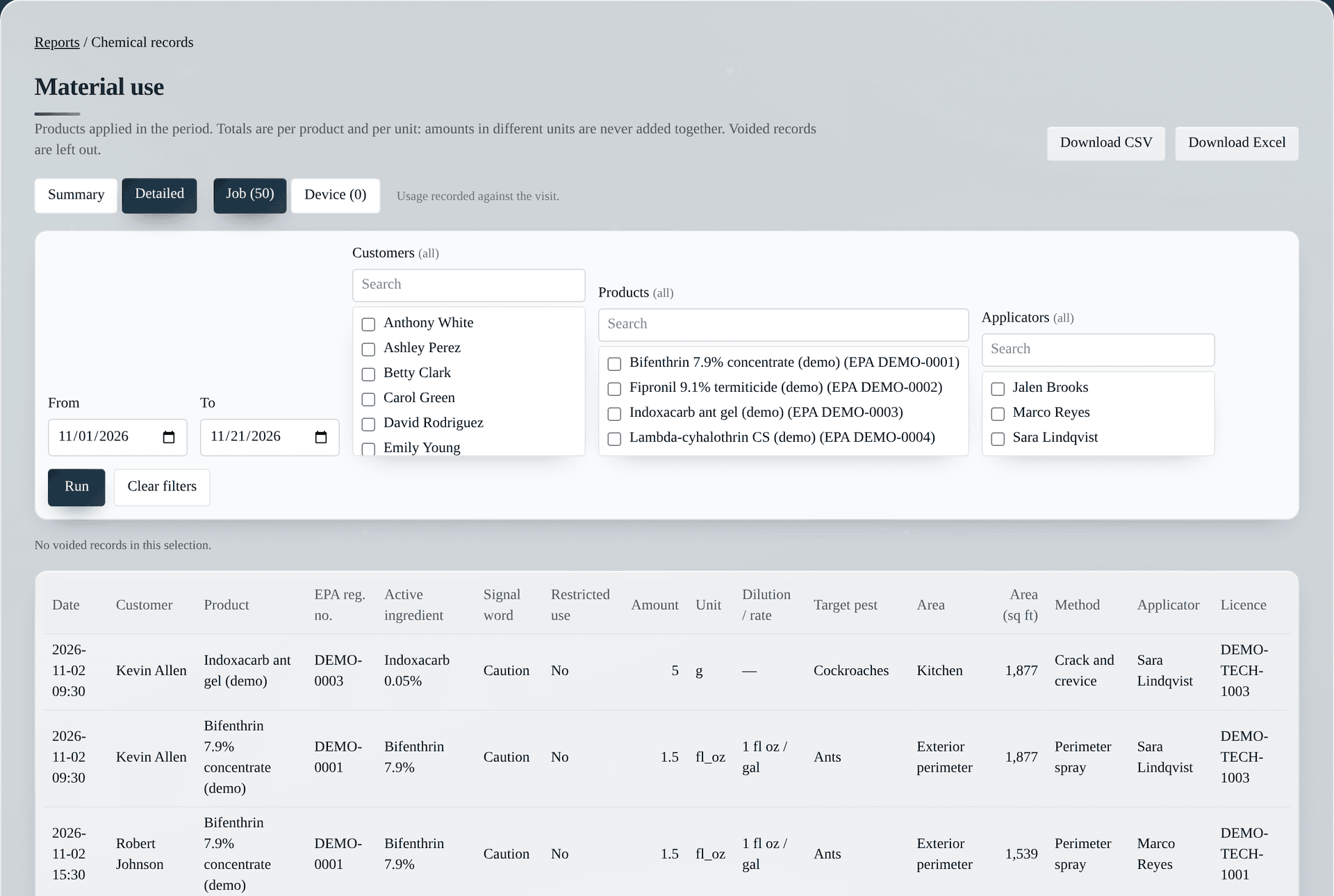
Chemical records
Every product applied, one line each, with what your records need on it. Filter it down and download it.
- EPA registration number, active ingredient and signal word
- Amount, dilution, target pest, area and method
- Applicator and license number on every line
- CSV and Excel downloads
The office
Plan the day and change it when the day changes.
- Dispatch board
- Drag jobs onto technicians and see the whole day at once.
- Week view
- Look ahead, spot the gaps and fill them.
- Route planner
- Put the stops in order on a map before the trucks leave.
- Technician location
- See where each technician is while their field app is open.
- Leads
- Every request in one list, from first call to booked job.
- Reports
- Revenue, jobs and what is owed, with spreadsheet export.
- Drive time on the board
- See the minutes between stops while you plan the day.
- Branches
- Run more than one location, with filters and revenue for each.
- Custom fields and statuses
- Track what matters to your shop, and name job stages your way.
- Saved views
- Keep the customer and job lists you look at every day one click away.
- Rules in plain English
- Describe what should happen. Nothing runs until the owner approves it.
- Open API and hooks
- Connect other tools with keys you control and signed outgoing hooks.
The field
One app on the technician’s own phone. No store download.
- Works offline
- No signal at the house? The visit still saves and sends later.
- Checklists
- The steps for each service, so every visit is done the same way.
- Photos with markup
- Take the picture, circle the problem, attach it to the visit.
- Signatures
- The customer signs on the phone.
- Talk to log
- Say what you did and it is written into the visit notes.
- Records for your trade
- Products used with EPA numbers, water tests, refrigerant and equipment readings.
- Time clock
- Technicians clock in and out on the phone. The office gets time cards.
- Units and devices
- Units inside one property, and bait stations checked by barcode scan.
- Measure on the map
- Trace a lawn or roof on the map and price the estimate from it.
Getting paid
From the quote to the money, without typing it twice.
- Estimates
- Send a quote. The customer approves or declines from the link in their email.
- Good, better, best
- Offer options on one estimate and take a deposit when the customer picks.
- Schedule from an estimate
- An approved estimate becomes a job in one step.
- Invoices
- Clean PDF invoices with your name and license on them.
- Pay links
- The customer pays by card from the email, through your own Stripe account.
- Recurring plans
- Monthly, quarterly or yearly service with automatic card payment.
- QuickBooks Online
- Customers, invoices and payments sync to your books.
- Job costing
- Profit on every job after labor and materials.
- Commissions
- Production and sales commissions worked out for you.
Your customers
They can reach you without calling during dinner.
- Online booking
- A booking page for your company that takes requests day and night.
- Customer portal
- Visits, estimates and invoices in one place for each customer.
- Reminders
- Appointment reminders by email.
- Review requests
- An email two hours after a finished visit, asking for a review.
- Website chat
- A chat box for your website. Messages land in your office inbox.
- Email replies
- When a customer replies to an email, it shows up in the same inbox.
- Broadcasts
- Email a group of customers at once, with an unsubscribe link on every message.
Setup and help
You should be scheduling on the first day.
- Starter pack for your trade
- Services, plans and checklists are loaded when you sign up. You set the prices.
- Tina, the setup assistant
- Ask how to do something and get walked through it.
- Import
- Bring customers and past visits in from a spreadsheet, checked before saving.
- Export
- Take all of your data out with one click.